Almost Timely News: 🗞️ 18 Ways To Save AI Token Budgets (2026-05-17)

Almost Timely News: 🗞️ 18 Ways To Save AI Token Budgets (2026-05-17)Save time, save money, get better results
Almost Timely News: 🗞️ 18 Ways To Save AI Token Budgets (2026-05-17) :: View in Browser
The Big PlugsNew things! Content Authenticity Statement99% of this week’s newsletter content was originated by me, the human. The TLDR image was generated by ChatGPT. Learn why this kind of disclosure is a good idea and might be required for anyone doing business in any capacity with the EU in the near future. Watch This Newsletter On YouTube 📺
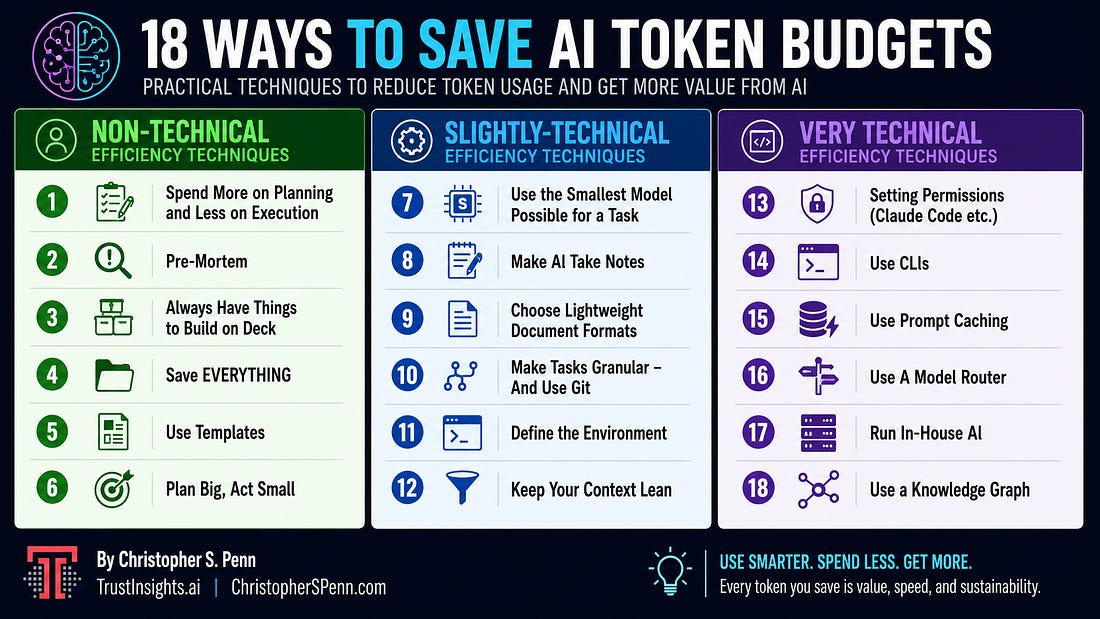
Click here for the video 📺 version of this newsletter on YouTube » Click here for an MP3 audio 🎧 only version » What’s On My Mind: 18 Ways To Save AI Token BudgetsIn this week’s newsletter, let’s talk about making AI as efficient as possible. By efficient, I specifically mean using as few computational resources as possible. I collaborated on a piece with Andy Crestodina over on his blog about document formats and making AI more efficient, but I wanted to dig much deeper into the more technical stuff here. This past week the term “token budget” kept coming up over and over in conversations, particularly with enterprise leaders. When we talk about token budget, they’re talking about the amount of AI that their organizations are allowed to consume - based on what they’re paying at an enterprise level to companies like Anthropic, OpenAI, and Google. This newsletter accompanies Andy’s article on AI efficiency, which I was pleased to contribute to. TLDR: Here’s an Infographic
In case you don’t have time to read all 10,000 words. Image made by ChatGPT from this newsletter’s content. Part 1: Why Do We Care About AI Efficiency?Companies like Anthropic, OpenAI, and Google allow customers to buy large blocks of tokens to be used with things like AI agents and agentic coding tools. In the past, when we look at the five levels of AI, level one was sort of the ChatGPTs of the world where you didn’t really have to worry about token budget and you could pretty easily break even with things like $20 a month subscriptions because the average person’s not going to blow through hundreds of millions of tokens in a single chat. The architectural limitations of the software prevented it from doing that in the first place because they would lose context so quickly that they would never come close to hitting those budgets. But once things like level three systems, Claude Code, Claude Cowork, OpenCode, etc. started debuting and tools became more autonomous, it was much more possible for AI tools to just consume mass quantities of tokens, hundreds of millions of tokens in a session. Now, as a brief primer and a reminder, a token is when you take something like a word or some pixels or whatever, and you digest it down into mathematics. You digest it down into a number, and then generative AI models are built by measuring the statistical relationship of different tokens to each other. That’s how large language models and vision language models and how everything in generative AI works. That’s why you can say “I pledge allegiance to the” and then that next word, the prediction is almost certainly going to be the word “flag” in North American English. Tokens are the unit of work as well. When a model is doing predictions, it gets input tokens, which are the things that we prompt it with, such as documents, such as our chats, our voice memos, our images, our videos, and then the outputs are also tokens when the model creates things such as words, code, images, music, etc. And everything consumes tokens. One of the quirks of generative AI is that all AI models, regardless of who makes them or how they’re made, all have absolutely no memory. They are completely stateless, which means that they remember nothing, even from interaction to interaction. When we are chatting with the model, the entire chat is passed back through the model to do its next predictions. What we say, what it says, all becomes part of the next prompt. Imagine you’re talking to a friend, and you’re texting with this friend, and for some reason, they copy-paste the entire conversation back to you every time they respond. That would be a strange friend, but that’s exactly what’s happening when you’re having a chat with AI. And so token usage explodes exponentially because tokens compound as a chat gets longer; it becomes exponentially larger. It’s a phenomenon called quadratic scaling. The executives I talked to this week when talking about things like token budgets are talking about how to make AI more efficient. They’re given a certain amount of budget to work with, and one over-eager developer who deploys an AI agent could consume that budget at an alarming pace. One person said that at their organization, they had already hit their token budget on the 13th day of the month, and their token budget was not small. So efficiency is something that they care about, that enterprise leaders care about. How can we make the most of this budget? You don’t want to underuse it because there isn’t a single provider that offers rollover on all tokens purchased - it’s use it or lose it. But you don’t want to be over budget either, and either get locked out or end up paying overage charges, what companies like Anthropic call extra usage. So those are key considerations when it comes to token budgets. For the individual, many of us don’t pay for the super deluxe top-tier AI subscriptions, but even in those subscriptions, you are given a limit. Anthropic’s Claude Max subscriptions have exceptionally opaque token budgets that give you a percentage of how much you’ve used. You have no idea how much you actually have to work with. Other companies like Minimax tell you how many requests to the API you have each week, and the tokens can flex based on that. People who pay for the low-end plans, the $20 a month plans, the $25 a month plans hit usage limits very, very quickly. And so it is absolutely imperative that they be as efficient with AI as possible to keep their token usage as low as possible so they can get more time with the model before it hits its ceiling of limits. Finally, as Andy mentioned in his article every token that you consume, every token that you use, costs actual resources. This is energy in the form of electricity. This is fresh water in the form of cooling, because today’s data centers are generally not terribly efficient. They generate a lot of low-grade waste heat that current data center designs are not equipped to reuse. And with opposition to data centers being built increasing - for good reason because they do consume a lot of land, they consume a lot of resources, and they don’t provide a lot of jobs once they’re built - it is incumbent upon us as both members of our communities as well as people who care about a sustainable AI future to use AI as efficiently as possible, to use as few tokens as possible, and in doing so use as few natural resources as possible. It’s about money, it’s about resources, and it’s also about getting things done. One of the absolute worst precedents set by AI thinkers in the last couple of years was Andrej Karpathy’s “vibe coding” concept, where you just sort of talk in the general direction of a computer and you have it generate things, and then you continue to have conversations to course correct it. As he calls it, you just “give in to the vibes” and let the machine figure it out. This is objectively the worst possible way to plan any project where you just wing it and hope that it all works out. That does not lead to success. You can very rarely overplan a coding project because there are so many things that can go wrong - you want to plan it out as much as possible and let the machines do the execution. This does two things. First, it preserves our cognitive skills of planning, organization, decision making, and problem solving, and it reduces token usage because if you’re not going back and forth in a gigantic chat, then you’re not running into that quadratic scaling issue where every line in the chat consumes the square of the previous lines, that exponential growth. If we can have those conversations outside of AI, or at least have those conversations and plan first, before we execute, we can reduce token usage. Remember, the more often you start a new chat, the lower your token usage because you’re not recycling the conversation over and over again. So that’s why we care about AI efficiency. It saves time, saves money, saves resources, and gets you ultimately to results faster. Part 2: How Do We Measure AI Efficiency?We measure AI efficiency based on usage. OpenAI and Anthropic and Google all tell you a percentage of usage, but they don’t tell you what the absolute numbers are, so you have no idea what your burn rate is other than percentage. That allows them to move the goalposts whenever they want. And some weeks it feels like you’re going through tokens faster or you’re going through uses faster than other weeks. At the organization level, you can see organization-level usage and which users are using up their budgets. And the smart organizations, of course, give budgets to individuals as well as have an organizational budget limit. But those usage monitors are your first indicator. Have them on display. And keep an eye on it. Take notes on it. You can do something as simple as leaving Slack messages to your coworkers saying, hey, today we are at this usage level. At Trust Insights, I will post typically in our operations channel and our Slack what our usage levels are once we get to about 60% and how many days are left until reset. That helps to bring transparency to what’s going on with your token usage. Claude Code /insightsClaude Code has a usage meter that shows you how you’re using tokens and what things are consuming the most tokens - which skills, agents, or tasks. Claude also offers a function called /insights that allows you to roll up your usage for the last week and identify what things went well and what things went poorly. This is a deeply underused feature in Claude Code that can immediately bring benefits, because Claude will write you better prompts to help avert issues that you run into. Token monitorsThe third way to measure AI efficiency is to use token monitors. These are effectively man-in-the-middle attacks of sorts, but sanctioned because you’re doing it to yourself. What you’re doing is you’re intercepting tokens as they go to and from your cloud provider, and you can see how much usage you’re doing on a token level. This is useful for the individual. At the organization level, it becomes a bit more cumbersome. But those are the three ways to measure AI efficiency, in terms of the tools that you’re given. And keeping an eye on them - aka managing what you measure - is the first step towards AI efficiency. You may find that there are things that are consuming an awful lot of token usage, or days of the week, or specific tasks. Having users with some level of self-awareness is really helpful. Which brings me to a small rant about one of the dumbest things that I’ve seen recently. The dumbest thing in the world: measuring AI adoption by token usageOrganizations are measuring AI adoption by how much the users are using. This is often called token maxing. And in terms of a measure of AI adoption, it’s a terrible measure. Because if you think about it, if you are holding people accountable to how many tokens they use, they have a natural incentive to use as much as possible, which we know means to be as inefficient as possible. If your organization is proposing some measure of AI adoption, token usage is the absolute worst metric. If anything, you should be encouraging people to use fewer tokens rather than more. Can they get the work done in as few tokens as possible? But you definitely should never make token usage a maximal-goal part of someone’s review. In the same way that it is supremely stupid, as Elon Musk did when he took over Twitter, to measure developers’ productivity by how many lines of code they write. This is an invitation to make code as bloated as possible to show that you’re productive. Instead of making code as small as possible to make it as efficient and as effective as possible. But people like that don’t have any clue of how to actually write good code to begin with. If they did, they would know that measure is counterproductive and deeply stupid. The bottom line here is that you should not be measuring AI usage as a proxy for AI adoption. Instead, measure the outputs people are getting. Are you getting to your outputs that you care about faster, better, cheaper? That’s the way to measure AI adoption. Part 3: Non-Technical Efficiency TechniquesSome will make smaller dents than others, but all of them are useful. And the more of them that you can do and that your organization can do, the better performance you’re going to get in terms of what AI can produce. 1. Spend More on Planning and Less on ExecutionAs we covered in Part 1, the vibe coding approach is objectively the worst possible way to plan any project. You can very rarely overplan a coding project because there are so many things that can go wrong that you want to plan it out as much as possible and let the machines do the execution. This does two things. First, it preserves our cognitive skills of planning, organization, decision making, and problem solving. And it reduces token usage because if you’re not going back and forth in a gigantic chat, then you’re not running into that quadratic scaling issue where every line in the chat consumes the square of the previous lines, that exponential growth. Make system diagrams for everything before you let machines run. When you’re using an agentic coding tool, ask it to build a markdown diagram, an HTML diagram, a mermaid diagram, anything that will demonstrate what the architecture of the system looks like that you’re having it build. And this is not just code. This could be the layout of a paper, how different sections relate to each other, the construction of a website. It doesn’t matter. What matters is that you want it to make system diagrams for you so that you can review the diagram and say, how well does the machine understand what I want? How well do I understand what I’m asking the machine to do? If you have diagram construction as part and parcel of your planning phase for anything that you’re using generative AI for, you will very quickly surface problems because the diagram will not match the reality that’s in your mind. It’s one of the most powerful things you can do. Then, once you’ve signed off on the diagram, you could have it build the rest of the plan, and by using good planning, you will reduce the number of back and forth turns you have to take with the model and reduce how many corrections and how much work it has to redo, which is, of course, inefficient. 2. Pre-MortemSomething that my CEO Katie Robbert taught me was to do a pre-mortem, a post-mortem before a project happens. This is when you sit down and you try to figure out all the things that could go wrong, what’s killed previous similar projects. It’s fundamentally all about asking the question “what could go wrong?” - and then building plans to prevent those things from going wrong before they happen. Generative AI tools are exceptionally good at pre-mortems as long as you tell them that’s what you’re working on. You can give them a project plan, a requirements document, a spec, and say, “let’s do a pre-mortem and figure out where this is likely to go wrong”. What did you forget? What did you overlook? What violations of best practices are in the plan? Then you take the findings of the pre-mortem and you go back with your AI tool of choice and revise the plan to close those gaps. When you do that, you will have a much better plan, which will lead to a much better implementation plan, which will reduce the number of mistakes and rework that you have to do. 3. Always Have Things to Build on DeckToken efficiency isn’t just about staying under your budget, it’s also about maximizing the tokens you get. As mentioned earlier, companies like Anthropic, Google, and OpenAI give you a certain amount of use-it-or-lose-it budget every week. If you don’t use all the tokens allocated to you that week, they’re gone. There’s no rollover. The good news is that these services all tell you when the next reset is. And if you have a backlog of things that you want to build or plan, then when you get to the last 24 hours or 12 hours before reset, you can kick off one of these backlog projects to use up those tokens. I recommend investing the time on planning. Have a backlog of crazy ideas and use the 5P Framework by Trust Insights to flesh out those ideas. Then, when you’re at the end of a reset period, and you’ve got token budget left and only a few hours left to go, you can kick off the formal planning and use up the remainder of the tokens. And if the planning doesn’t finish by the time the reset window happens, then you can save what you’ve done so far. And then the next time you have an unused token window, you can continue the planning. That process of having an eternal number of ideas to bring to life means you’ll always have something to use up and soak up those extra tokens that are use-it-or-lose-it. 4. Save EVERYTHINGWhen AI produces something, anything at all, you should be saving it in some capacity unless it’s truly incorrect. But all the things that occur in a chat you want to save [A] because you’ve already burned those tokens to make those things, and [B], because there’s a strong chance some of it may be reusable. I’ve had many a coding project where maybe the idea I had didn’t work out, but the AI agent wrote something that was so useful I could reuse it elsewhere with minimal changes. And again, this can be anything, not just code. If AI writes a particularly catchy piece of fiction, like a short story, you can say, hey, reuse the writing style from this story in a non-fiction piece, like a blog post or in a video script. The more you can reuse, the fewer tokens you have to burn reinventing things. Reinventing the wheel is one of the biggest cardinal sins that AI does all the time. The more we can give it stuff that already exists - stuff that is already high quality - the fewer tokens we’ll burn, and the faster we’ll get to high quality results. Another concrete example is in the Hermes Agentic system - which we talked about on a recent Trust Insights live stream - Hermes builds its own skills. From time to time, I will go into my Hermes installation to see what skills it has built, and then copy and paste them back into my Claude Code because sometimes it comes up with something that is really interesting and innovative. Why should I reinvent it? Why should I reinvent the wheel by making Claude generate a similar thing when I can literally just copy and paste it out of my Hermes into my Claude? All these different AI tools have common standards like the Skills standard that we can reuse information over and over again. So make sure that you save everything and make sure you reuse as much as you can. You paid to generate those things. Get some more use out of them. 5. Use TemplatesThe more we tell AI what to do and how to do it and what the expected outcome is, the fewer tokens it uses, because today’s models are all reasoning models. They all do a rough draft behind the scenes before they answer, for most of the big models and players. This level of reasoning delivers great results, but at the expense of more tokens consumed. And the more vague or unclear you are in the usage of a model, the more token usage you burn because the model has to sit there and reason things out. When you use a model that’s open weights, where you can see the actual thinking traces - such as DeepSeek or Alibaba Qwen or Minimax - you can watch it reason and you can see where it hits stumbling blocks about what it thinks you mean. If I say “use as few words as possible”, it will have a debate about it with itself to say, well, maybe the user meant this, well, maybe the user meant that. If you say “answer the question in 10 words or less”, now instead of saying few words and having it debate what does that mean, you give it an objective measure. You say do 10 words, and even better if you give it a tool like the word count tool built into most operating systems. It doesn’t even have to do the counting for you. All of these things reduce token usage. Give your agentic tools, give everything clear, objective, measurable outcomes, and templates, and prepared materials so that the model does not have to guess or infer what you meant. If you have a monthly report that you want to generate, provide it with a template to fill in rather than having it reason through and try to think through what the report should be. You give it clear boundaries to operate in, you give it a set of guardrails, and it will be much more successful. This is why things like the 5P Framework and templates are so important, standard operating procedures, because they reduce the amount the model has to think. Instead, the model just has to follow instructions and reuse what’s already been provided to it. That’s a massive advantage for reducing token usage. 6. Plan Big, Act SmallThis is something from my book Almost Timeless. I wrote about this last year in 2025 when I published the book. And it is more true today than ever. A model’s size is directly correlated with its intelligence. The bigger the model is, generally, the smarter it is because the more training data it’s seen, the more parameters it has - aka, the larger its database or memory is. Big models are great at planning and reasoning, but they are slow, they are incredibly power hungry, and they are expensive. For example, at Anthropic, OpenAI, and Google, different models consume your usage at different rates. Anthropic charges more tokens per use for using Claude Opus than it does Claude Sonnet or Claude Haiku. So generally speaking, we want to plan big, act small. Use the big models for doing our planning to work out what it is we want to do, why it is we’re doing it, using the 5P Framework by Trust Insights, building our requirements documents, our technical specs, and our work plans. And then once the planning is done, we switch to a smaller model that is going to do the execution. If the plan is really good and it has things like purpose, people, process, platform, and performance, and objective measures of success, a small model can get a lot done. A model like Qwen 3.6, for example, from Alibaba that you run locally on a well-appointed laptop or in your local infrastructure, can accomplish everything in a plan. And as long as there are clear success metrics that are measured deterministically - like does this code run, or is this document in active voice, or does this have the correct stylometry compared to the source document - the model will do a great job of working and reworking as needed to achieve the technical and objective measures you give it. Using a big model to do execution work is a waste of usage, it is a waste of energy. It’s like taking a Harrier attack jet to the grocery store. Can you do that? Yes. Is it a complete waste of resources when a bicycle will do? Yes. Think of your usage the same way. You want to plan with the biggest, smartest models possible to anticipate and work out what could go wrong, and then do the execution with the small model, and then do your audit and evaluation - like your QA phase - with the big model, and then do all the fixes with the small model. This is such a basic design pattern that it is even built into some providers. There’s a mode in Claude Code called Opus Plan, where when you put Claude Code into planning mode, it uses Opus, and when you put it into edit mode, it uses Sonnet. So it flips back and forth between its two models based on the type of work that you’re doing. This is what you want to get in the habit of with everything in AI. Plan big, act small. Part 4: Slightly-Technical Efficiency Techniques7. Use the Smallest Model Possible for a TaskChoose the right model for the size of task. Generally speaking, tasks where you’re providing all the data and having models do things like summarize or rewrite, you can get away with using a smaller, lighter, faster model. For example, in Google’s Gemini system, there’s Gemini Flash and Gemini Pro. Flash is faster, not as smart, but uses far less energy in compute than Pro does. In OpenAI’s ChatGPT, there’s thinking, instant, and pro extended usage. Pro consumes the most energy and power, and using it to do something like summarizing an email is patently absurd. There’s no reason to use that model to do a simple task. If you’re doing something that’s going to require two or more rounds of revision, then use a pro model. That’s an easy, non-technical way to decide what tasks belong with which model. 8. Make AI Take NotesOne of the things that happens often is that context windows - the short-term memory of AI models - fill up. And when they fill up, almost every agentic tool has to run a compaction process, or alternately, it just kind of loses coherence and goes off the rails. Sometimes, when it runs a compaction process or when it forces you to start a new session, it loses any memory of what it’s done in that session, which is incredibly frustrating because it now means you have to have it redo all the work that it did. This is a massive waste of tokens and also a massive waste of your time. If, on the other hand, you have the model taking notes on disk in a notes folder as it’s working, and these can be terse notes, then if something happens along the way - if it crashes, if it compacts too far, whatever - you can direct it to go back and read its most recent notes. I recommend generally giving it a prompt along the lines of “you’ll take notes in the output notes folder in date timestamp format notes related to this project with the file name. You’ll use lexical density and lexical compression to create as much information density in as concise a note as possible.” That way you’re not using a ton of extra tokens to take notes along the way, but then if you have to stop or restart, it’s very easy to help the model pick up where it left off and not repeat work. 9. Choose Lightweight Document FormatsAndy talked about this in his article, and I loved his rule of thumb. At least I think it was his, it might have been someone else’s. So Notepad or TextEdit or a lightweight text editor is the smallest, lightest document editor. Any format that you can read without needing extra software besides a text editor is what you should be using with AI. So a Word document you can’t open without extra software. A PDF you can’t open without extra software. A spreadsheet, a PowerPoint, all these different document formats are things you can’t work with without an external application of some kind. Formats like text, Markdown, YAML, JSON, Mermaid, JavaScript, HTML, CSS - these are all things that can be worked with a plain text editor and thus are more efficient for AI models to work with. I prefer YAML for anything that is tabular data because AI models tend not to do well with CSVs, and loading a CSV document can force the model to have to write Python code to process it, which defeats the point of reducing token usage. Using YAML means the model can read that data natively and not have to process extra. Markdown encodes structure into documents like headings and formatting, but it doesn’t add a ton of extra weight and is probably the best overall format. The added bonus of formats like YAML or Markdown or other text only documents is that they are eternally accessible. A text document that I wrote in 1993 in college, I can still open today with no extra software. A Word document from that period of time needs to be converted several times to get into working order. A PDF from back then might not even open in today’s modern PDF editors. If you are doing a lot of work for stuff that you want to stick around for a while, text formats are eternally readable, and your great grandchildren will be able to open them up in whatever system is available at the time and work with them. So be sure that you’re using those lightweight text format documents. 10. Make Tasks Granular - And Use GitIf you plan well and you spell out the tasks that a model has to do in order, then it’s more likely if something goes wrong for it to be able to roll back and wind back to where it was previously. This is also one of the reasons why you actually should be using Git for every project. Git is a version control system that stores copies of everything and tracks changes you make in documents on your computer in a certain folder. Git was made for developers to track versions and be able to roll back if code went bad or something didn’t work, etc. It also allows for things like branches and worktrees so multiple people can work on the same code base at the same time without conflicting. And then when they check their work back in and merge it, they can resolve conflicts and keep their versions on the rails. AI will know how to set this up for you and how to run it. As long as the Git repository itself is well maintained by the AI, you can roll back changes you’ve made if it suddenly made really bad changes without having to start over from scratch. So if you have it writing a hundred blog posts and you notice blog posts 73 through 78 are all incoherent messes, instead of having to restart the task, you can say roll back the repository to blog post 72 and then pick up at post 73. And it will be able to do that, preserve all the work you’ve done, keep all that work that was made with all those tokens, and only fix the things where you identified that something has gone wrong. I cannot begin to tell you the number of times that I have been thankful that a Git repository was set up in a project of mine that had nothing to do with code, but instead was documentation or some kind of planning or some kind of strategy document where something went wrong, and I could simply roll back, and because it’s a CLI software, it doesn’t consume AI tokens to do that kind of rollback or to merge changes. The software is deterministic and it was built for developers well before AI was a thing. The more granular a task is, the easier it is to roll back changes, which is why you want to plan to have tasks be as granular as possible. 11. Define the EnvironmentThe more time you spend setting up your workspace, especially when you’re using agentic tools like Claude Code or Claude Cowork, the more efficient you’ll be in the actual usage of AI. Think about all the things that AI would have to research and repeat over and over again. Things like who your company is, what you do, how you do your marketing, how you do your analytics, what your products and services are, who your ideal customer is, what your value propositions are. All that stuff should be written down in your environment - what we call knowledge blocks, and what the tech bros like to call context engineering - and made available to AI to draw upon when it needs it, so that it’s not doing things like running web searches, which consume a lot of tokens and slow things down, and so that it’s not hallucinating, which then makes you have to do rework to correct the machine. The more of that stuff you write down in advance, you can put in your environment, the better AI will perform. As another example, your coding standards, if you’re writing code, should be written down on a per-language basis and provided as part of your environment. This tells the AI up front what is acceptable and what is not. And ideally, those coding standards are some form of checklist so that you can tell it “this is what to do to check your work”. By providing templates, structures, checklists, and knowledge blocks, you are helping AI think less. You’re telling it “you don’t have to reason this through, I’ve already done it for you”. The more you do the thinking, the lower the token usage. Because you’re taking away the thinking task, you’re offloading the thinking from AI to you. And because many tasks are highly repeatable, the more thinking that you do the first time is thinking you don’t have to repeat each time - and you certainly don’t want AI repeating that thinking over and over again. Other things that belong in your environment? A lot of agentic tools have the ability for you to define either an AGENTS.md file or a CLAUDE.md file, depending on the system you’re using. A lot of people have a tendency to load these files up with everything in the kitchen sink because they are files that the model reloads every time it compacts a session or starts a new session. This is a mistake. You should not be putting everything and the kitchen sink in these files. Instead, what you should be putting in them is the stuff that the machine does wrong. Your other general directives and knowledge and stuff belong in document files and in planning documents. If you use those very heavy, highly dense instructions and background information during the planning process, then the model and the harness and your tools will build good plans. And then when the model follows those plans, it doesn’t have to reload all that information because it is implicit in the plan. For example, if you say you must use a certain type of statement in your code, or you must use a certain type of voice in your writing, or a certain type of color scheme in your brand style guidelines - if you get that into great plans up front, then you don’t have to worry about defining that over and over again during the build process, and it doesn’t need to be in a CLAUDE.md where it sucks up extra tokens to reread the same knowledge over and over again. Instead, if you’ve been following the advice so far, you would have those brand style guidelines be a part of the checklist. The checklists are part of the system so that when the model runs its quality gates at the end of a build process, it has the ability to check whether it correctly used the brand style guidelines. So instead of having the same model knowledge loaded over and over again, if you create great quality gates, checklists, and incorporate the necessary information in the planning process, you will dramatically reduce the extra unnecessary tokens. 12. Keep Your Context LeanAll the major tools - like Claude Code, Claude Cowork, OpenWork, OpenClaw, GitHub Copilot, OpenAI Codex - offer you the ability to add all these different connectors and things to your system to connect your HubSpot and your Fireflies. Every connector you have installed that is turned on consumes memory, and the more stuff that is in memory, the more tokens it uses, and the slower your AI runs, and the faster your bill goes up. Before you start on any task or project, review what’s turned on and turn off anything you don’t need. If you have a PowerPoint skill or agent and you’re not making PowerPoint slides, turn it off. If you have a brand style guidelines CLAUDE.md file, swap it out for one that doesn’t have all that extra data if you’re not going to be doing stuff that needs to be branded. This is all about environmental management. The less that is loaded in memory, the fewer tokens it consumes. And remember, every time AI interacts with you or itself, it rereads the entire conversation, including all those extra skills and agents and things that essentially are wasting tokens because you’re loading them, but you’re not using them. Keep configurations and swap them in and out programmatically on your computer so that when you’re starting a new task, you can say, before you turn on Claude Code, hey, this is the kind of task we’re doing. Once you do that, make sure that it loads only the skills and agents and MCPs and connectors that it needs for that task and it unloads the rest. That way you’re not consuming lots of tokens for no reason. One additional side benefit of this is that everything that is in a skill or agent becomes part of the context, the short-term memory for given tasks. So if you have a PowerPoint agent in Claude Code and you’re doing SEO work, that language for how to build PowerPoints is silently influencing your SEO work and contaminating it. There are probabilities attached to all that language which can influence the tasks you’re working on. So it’s not enough to just start a new task, which you should be doing frequently, but you also have to make sure as part of that task, you have turned off everything that is not relevant to that task so it’s not polluting your context. Part 5: Very Technical Efficiency Techniques13. Setting Permissions (Claude Code etc.)Another area, particularly for agentic coding tools, is when you are setting up your environment, set up your permissions in advance. Every tool asks for permission to do certain things, certain commands, etc. The more it has to stop and ask you for things, the more that pollutes your context and the more tokens that it uses. If you spend a little time in your planning process to define permissions up front of what it can and can’t do, it reduces all that back and forth conversation, and it will only ask you for things that maybe you didn’t foresee, or for dangerous commands like deleting files. Everything else you work out in advance. This is easy to do if you have a great plan. If you have a great plan with a PRD, a spec and a work plan, you can hand the work plan to a cloud-based model and say, give me the permissions list for my agentic tool of all the operations that it’s likely to need for this project so that we can define them and give permission in advance, and it doesn’t have to keep interrupting me to ask for things. And anyone who’s worked in a system like Claude Code knows that the more it has to stop and ask you, the more chances are that you don’t see the notification, and then it just hangs out there waiting and not doing work on your behalf. And then you get back to the application, you get back to your desk, and you’re frustrated that it’s been waiting the entire time to ask for something simple. 14. Use CLIsCommand line tools, or command line interfaces, are static programs, pieces of software that are installed on a computer. They don’t have a graphical user interface, so there’s no fancy application. It’s literally just a text window. But command line interfaces are deterministic. They are not things the language model has to create. AI in general has a bad tendency to reinvent the wheel constantly when it tries to do a task like parsing JSON, for example. It will rewrite and write and rewrite a JSON parser over and over and over again, which is a complete waste of tokens, and it slows down your work. Instead, you tell it to use the jq utility on my computer, because chances are it’s either there or it can be installed there to parse JSON instead. And now instead of having to rewrite a parser every time it wants to think through a piece of JSON script, it can just use the built-in tool, which uses no tokens at all because it sits outside of AI. The AI world got enamored with the model context protocol, or MCP, in 2024 and 2025. These are APIs effectively for AI, but they are incredibly inefficient. They are very, very slow, and they are probabilistic, meaning that when AI uses them, it tends to get different results because of the probabilistic nature of the models themselves. This is highly problematic and incredibly inefficient. As a concrete example, you can install an MCP for Google Calendar. When you run the Google Calendar MCP, it takes minutes to extract data, burns a ton of tokens, and sometimes doesn’t deliver a useful result of like what’s on your calendar that day. If you install the Google Workspace command line tool, AI just has to write the short command shell query to tell the computer itself to run the Google Workspace Calendar interface. It does it, it returns its results. And all the AI has to do is interpret the results, which typically come in some form of structured data that makes it even easier for the machine to parse the results. This is a massive token savings. The machine is not having to think and rethink how to work with the calendar software. All it has to do is interpret the JSON results that come back and know how to slot that into the answers. Command line tools are lightning fast, and consume no token budget. When we use command line tools, we’re not confusing the AI with all the extraneous chatter of working with an MCP and getting data and interpreting it. That fills up the context with garbage. Instead, a deterministic tool, a command line interface, just gets the data, brings back the data, and says to the model, here’s the data, and you have none of that back and forth where the machine is talking to itself, causing all sorts of context pollution and burning a lot of tokens unnecessarily. Almost every major cloud service that you would want to pull data in and out of, like Asana, Jira, Google Calendar, your mail inbox, has some form of command line tool available. We’ve talked about in past episodes of the newsletter in previous weeks about installing them and using them in things like Homebrew on the Mac, Chocolatey on the Windows platform, and of course the package manager in your Linux distribution. These command line tools will save you a lot of time and tokens. 15. Use Prompt CachingThough it’s usually baked into most agentic harnesses, it’s still worth mentioning that prompt caching is one of the best ways to reduce your prompting costs. Caching saves the existing conversation so that every time you prompt, you’re not loading the entire conversation from scratch. It’s dependent on the model, the server, and the harness. If you are using an inference provider such as Cerebras or DeepInfra, be on the lookout for models that support caching and models that do not. In general, a model that does not support caching is going to cost you much more very quickly. If you’re using a system like OpenClaw or Hermes agent or other fully autonomous agents, use a tool like Claude Code to audit how well they execute prompt caching before you settle on the platform. Choose the platform that caches the most, because this will save you lots of money. Prompt caching also dramatically accelerates AI productivity because the more you’re reusing saved prompts that the system automatically manages, the less time it has to spend generating the same tokens. It makes your AI usage incredibly fast. 16. Use A Model RouterThere are many AI model routers. These are tools that silently manage different endpoints in your AI systems. So, an example is something like OpenRouter. You can also build these into your code if you’re writing code with tools like LiteLLM. And what a model router does is it has its own lightweight model. Typically, this is something that’s run on premises or even on your machine, that reads the prompts and instructions you’re sending along and then tries to assess which model is best suited for this task. If it detects that you’re doing a planning task, then it’ll route it to a planning model. If it’s doing an execution task with writing code, it will route it to an execution model. Model routers are part of your infrastructure, they are part of your IT setup or your dev team setup. And once you have them in place, as long as you have tested them properly and validated that the correct models are running when they’re supposed to be, they can save you quite a bit of token budget because they’re routing things to the smallest, lightest, cheapest models for any given task. Which goes back to what we were talking about earlier in the section on using the smallest model possible - ensuring that you select the correct model for any given task and not having super giant models running menial tasks. 17. Run In-House AIThese are AI models and harnesses that you run on your internal infrastructure, whether that is at your company, whether that is even on your laptop, if you have a well-appointed laptop. If you have a laptop with a good graphics card, and the easiest way to check this is if you can run a video game at full resolution and full speed and not have it stutter or lag, like Call of Duty or World of Warcraft, you can use robust AI models on your computer. For example, a MacBook with an M series processor and 32 gigabytes of RAM can run very proficient AI models that can accomplish a lot of tasks, and you won’t need cloud-based models at all. This dramatically reduces the resources you need because if a model is running on your laptop, you know where that processing is occurring. And yeah, it might spin your laptop’s fans, it might heat up your office or your house a bit, but you’re not using fresh water to cool a massive data center for that level of processing. Especially if your home or office electricity is from renewable sources, then you know for sure that the energy that your AI token usage is using is clean and renewable and sustainable. If you are financially able to do so, and it is a big lift, there are devices you can run, such as the Nvidia DGX Spark or the ASUS GB10 machine. These are machines that cost four to five thousand dollars US, but they allow for extremely robust use of AI in a local environment and state-of-the-art models that deliver incredible performance. If you can do your big planning with a heavy cloud model like Claude Opus and then hand off the execution to a local model running on your own hardware or even on your own computer, you will dramatically cut down on the environmental impact of AI as long as the energy powering your own system is sustainable. One other benefit of in-house AI is disaster recovery and business continuity. When you run your own AI on your own computers, those outages are less unexpected. You know when you’re turning off your computer. You know when your software is running. There are projects like EXO that allow you to network your office computers together to create a miniature AI supercluster that allows multiple people to use each other’s hardware to serve up robust AI models. It works best on the LAN, though it does work on a tailnet WAN. But in-house AI is one of the best ways to offload some of the AI burden to small models that are capable as long as they have great plans to work with. Oh, and as another side benefit, when you use AI on your hardware, you are in complete control of your data at all times. 18. Use a Knowledge GraphKnowledge graphs are something from a much earlier generation of AI called symbolic AI or rules-based AI. Knowledge graphs are part of what’s called ontology, which is mapping out the structure of your data. And this involves things like what’s called AST - abstract syntax tree - that maps and compresses the relationships of objects within an environment. It’s mostly used in coding, but knowledge graphs apply to everything, to all forms of knowledge. You can use a free tool like graphify to digest a body of text - files on a computer in a folder - and produce a structural map of the key concepts in those files. And then tell AI, instead of using its find-and-replace functions, which load up the memory with an entire document just to find a single thing, it can use the knowledge graph to identify just the portion of the document that is relevant to what you’re talking about. This works best with documents that are numerous and small. You’ll get much better results, for example, having a 200-page book split up into individual pages, with each page being its own document, so that the AST system can say “you just need to read page 201, you don’t have to read any of the other pages of the book.” Smaller, more numerous files give the knowledge graph the precision to find exactly what you need - without loading everything you don’t. Part 6: Wrapping UpAs you’ve noticed, the techniques in the previous parts are in order from least technical to most technical. And as I said at the beginning, you don’t have to use every single technique, but the more of them that you can put together, the greater your AI efficiency will be. As more enterprises adopt AI, as more AI users move up the levels of AI to using AI agents, token efficiency and token budgets will become the watchword for organizational use of AI. There are some even more technical and arcane tricks that we can use for token efficiency, but they are beyond what most organizations would find practical, such as mixed-precision quantization of models. People who run their own servers will need to know this eventually, but for the average user, these are not as important or will deliver as significant gains in terms of efficiency as everything that’s been in this newsletter so far. We all have an obligation to make AI as efficient as possible. This preserves natural resources that grow more scarce by the day. This reduces our bills and preserves our budgets. This makes AI as efficient and as effective as possible by letting the technology focus on what it’s best at and removing all the things that it’s not good at. And this gets us to the results we want as quickly as possible. Better, faster, and cheaper - what’s not to love about AI efficiency optimization? Your homework from this newsletter is to implement at least one of the techniques from this week’s newsletter. Adopt as many as you can, but I would for sure start with planning more, saving everything, using templates, and planning big, acting small. If you can start with those four principles, you’ll dramatically reduce AI efficiency waste. How Was This Issue?Rate this week’s newsletter issue with a single click/tap. Your feedback over time helps me figure out what content to create for you. Here’s The UnsubscribeIt took me a while to find a convenient way to link it up, but here’s how to get to the unsubscribe. If you don’t see anything, here’s the text link to copy and paste: https://almosttimely.substack.com/action/disable_email Share With a Friend or ColleaguePlease share this newsletter with two other people. Send this URL to your friends/colleagues: https://www.christopherspenn.com/newsletter For enrolled subscribers on Substack, there are referral rewards if you refer 100, 200, or 300 other readers. Visit the Leaderboard here. ICYMI: In Case You Missed ItHere’s content from the last week in case things fell through the cracks:
On The TubesHere’s what debuted on my YouTube channel this week:
My Merch ShopI’ve been adding so much stuff that I’ve decided to bundle it all in what I call a Merch Shop, because otherwise there’s literally too much to keep track of and I run out of space in my own newsletter. So welcome to the Merch Shop! Skills for Claude and Agentic AI: Books: Courses: Subscriptions: Recent TalksThese are just a few of the classes I have available over at the Trust Insights website that you can take.
Advertisement: New GEO 101 CourseWhen I talk to folks like you, being recommended by AI is one of your top marketing concerns in 2026. We’ve taken everything we’ve learned from OpenAI’s documentation, Google’s technical papers, patents, sample code, plus our years of experience in generative AI to assemble a high-impact 90-minute course on GEO 101 for Marketers. In this course, you’ll learn:
This course is meant to be used. In addition to the course itself, you’ll also receive:
And best of all, this is our most affordable course yet. GEO 101 for Marketers is USD 99 and is available today. 👉 Enroll here in GEO 101 for Marketers! Get Back To Work!Folks who post jobs in the free Analytics for Marketers Slack community may have those jobs shared here, too. If you’re looking for work, check out these recent open positions, and check out the Slack group for the comprehensive list.
Disclosure: I source these links from LinkedIn every week on the following criteria: New in the past seven days, Easy Apply on, remote roles, USA geography. How to Stay in TouchLet’s make sure we’re connected in the places it suits you best. Here’s where you can find different content:
Listen to my theme song as a new single: Social Good: Ukraine 🇺🇦 Humanitarian FundThe war to free Ukraine continues. If you’d like to support humanitarian efforts in Ukraine, the Ukrainian government has set up a special portal, United24, to help make contributing easy. The effort to free Ukraine from Russia’s illegal invasion needs your ongoing support. 👉 Donate today to the Ukraine Humanitarian Relief Fund » Events I’ll Be AtHere are the public events where I’m speaking and attending. Say hi if you’re at an event also:
There are also private events that aren’t open to the public. If you’re an event organizer, let me help your event shine. Visit my speaking page for more details. Can’t be at an event? Stop by my private Slack group instead, Analytics for Marketers. Required DisclosuresEvents with links have purchased sponsorships in this newsletter and as a result, I receive direct financial compensation for promoting them. Advertisements in this newsletter have paid to be promoted, and as a result, I receive direct financial compensation for promoting them. My company, Trust Insights, maintains business partnerships with companies including, but not limited to, Amazon, Talkwalker, MarketingProfs, Agorapulse, The Marketing AI Institute, Spin Sucks, and others. While links shared from partners are not explicit endorsements, nor do they directly financially benefit Trust Insights, a commercial relationship exists for which Trust Insights may receive indirect financial benefit, and thus I may receive indirect financial benefit from them as well. Thank YouThanks for subscribing and reading this far. I appreciate it. As always, thank you for your support, your attention, and your kindness. Please share this newsletter with two other people. See you next week, Christopher S. Penn Invite your friends and earn rewards
If you enjoy Almost Timely Newsletter, share it with your friends and earn rewards when they subscribe.
|






Comments